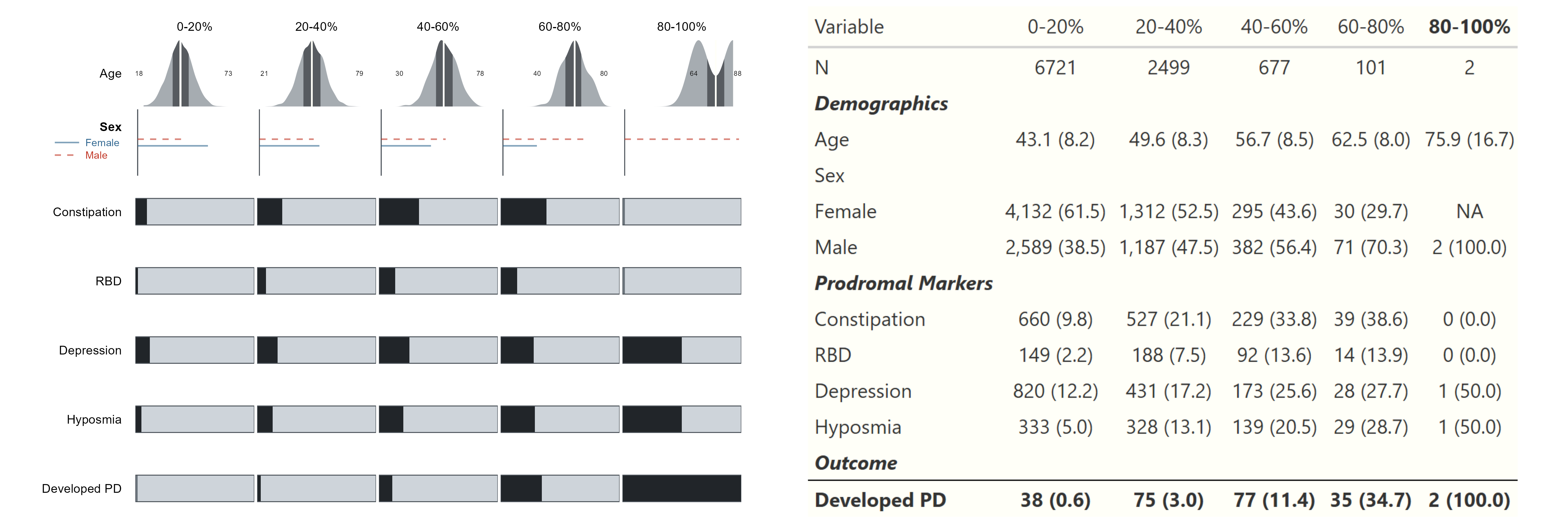
# WARNING - This is a LARGE FUNCTION (in text, not memory)
# =============================================================================
# TABLE 1 SYSTEM - COMPLETE
# =============================================================================
#library(data.table)
#library(ggplot2)
#library(gt)
#library(cowplot)
# -----------------------------------------------------------------------------
# GLYPH THEME SYSTEM
# -----------------------------------------------------------------------------
glyph_theme <- function(base_unit = 1, target = c("screen", "print", "slide")) {
target <- match.arg(target)
mult <- switch(target,
print = 1,
screen = 1.2,
slide = 1.8
)
list(
# Line weights
line_thin = 0.3 * base_unit * mult,
line_med = 0.5 * base_unit * mult,
line_thick = 1 * base_unit * mult,
# Text
text_small = 2.5 * base_unit * mult,
text_med = 3 * base_unit * mult,
text_large = 4 * base_unit * mult,
# Margins
margin_tight = 1 * base_unit * mult,
margin_normal = 2 * base_unit * mult,
# Bar proportions (relative to cell)
bar_pad = 0.3,
# Base colors
white = "#fffff8",
gray_200 = "#e9ecef",
gray_500 = "#adb5bd",
gray_900 = "#212529",
# Semantic colors
col_dark = "#212529",
col_mid = "#6c757d",
col_light = "#ced4da",
col_border = "#495057",
col_missing = "#fffff8",
col_background = "#fffff8",
# Density glyph colors
col_density_low = "#6c757d",
col_density_high = "#212529",
# Categorical palette
col_cat = c("#2F6690", "#C03221", "#F0A202","#1e5c4b", "#440381", "#C03221", "#730071" ),
# alphs controller (keeps from oversaturating, even if I like the colors a lot)
fill_alpha = 0.6,
# Line patterns for lines
line_patterns = c("solid", "dashed", "dotted", "dotdash", "longdash", "twodash")
)
}
.glyph_opts <- glyph_theme(base_unit = 1, target = "screen")
set_glyph_theme <- function(base_unit = 1, target = "screen") {
.glyph_opts <<- glyph_theme(base_unit, target)
invisible(.glyph_opts)
}
get_glyph_theme <- function() .glyph_opts
# -----------------------------------------------------------------------------
# TYPE DETECTION
# -----------------------------------------------------------------------------
detect_var_type <- function(x, var_name = NULL, na_levels = NULL, nominal_vars = NULL) {
if (!is.null(nominal_vars) && var_name %chin% nominal_vars) {
return("categorical")
}
if (is.factor(x)) {
levs <- levels(x)
if (!is.null(na_levels)) {
levs <- levs[!levs %chin% na_levels]
}
n_levs <- length(levs)
if (n_levs == 0) return("all_missing")
if (n_levs == 1) return("constant")
if (n_levs == 2) return("binary")
return("categorical")
}
if (is.numeric(x)) {
x_clean <- x[!is.na(x)]
n_unique <- uniqueN(x_clean)
if (n_unique == 0) return("all_missing")
if (n_unique == 1) return("constant")
if (n_unique == 2) return("binary")
if (n_unique <= 7) return("categorical")
return("continuous")
}
if (is.character(x)) {
stop(paste0("Variable '", var_name, "' is character. Convert to factor first."))
}
"continuous"
}
# -----------------------------------------------------------------------------
# DATA PREP HELPERS
# -----------------------------------------------------------------------------
prep_binary <- function(x, positive = NULL, negative = NULL,
pos_label = "Yes", neg_label = "No") {
if (is.null(positive) || is.null(negative)) {
unique_vals <- unique(x[!is.na(x)])
if (all(unique_vals %in% c(0, 1))) {
positive <- 1; negative <- 0
} else if (all(unique_vals %in% c("Yes", "No"))) {
positive <- "Yes"; negative <- "No"
} else if (all(unique_vals %in% c("yes", "no"))) {
positive <- "yes"; negative <- "no"
} else if (all(unique_vals %in% c(TRUE, FALSE))) {
positive <- TRUE; negative <- FALSE
} else if (all(unique_vals %in% c("Y", "N"))) {
positive <- "Y"; negative <- "N"
} else {
warning(paste("Cannot auto-detect binary coding. Unique values:",
paste(head(unique_vals, 5), collapse = ", ")))
return(factor(rep(NA_character_, length(x)), levels = c(neg_label, pos_label)))
}
}
factor(
fifelse(x == positive, pos_label,
fifelse(x == negative, neg_label, NA_character_)),
levels = c(neg_label, pos_label)
)
}
prep_factor <- function(x, levels = NULL, na_values = NULL, ordered = FALSE) {
if (!is.null(na_values)) {
if (is.character(x)) {
x[x %chin% as.character(na_values)] <- NA_character_
} else if (is.numeric(x)) {
x[x %in% na_values] <- NA_real_
}
}
if (is.null(levels)) {
levels <- sort(unique(x[!is.na(x)]))
}
factor(x, levels = levels, ordered = ordered)
}
prep_aou_factors <- function(dt,
binary_vars = NULL,
categorical_vars = NULL,
binary_codes = list(positive = 1, negative = 0),
na_values = c("PMI: Skip", "I prefer not to answer",
"None Indicated", "No matching concept",
"PMI: Prefer Not To Answer", "", 9, 99)) {
dt <- copy(dt)
if (!is.null(binary_vars)) {
for (v in binary_vars) {
if (v %chin% names(dt)) {
dt[, (v) := prep_binary(get(v),
positive = binary_codes$positive,
negative = binary_codes$negative)]
}
}
}
if (!is.null(categorical_vars)) {
for (v in categorical_vars) {
if (v %chin% names(dt)) {
dt[, (v) := prep_factor(get(v), na_values = na_values)]
}
}
}
dt
}
# -----------------------------------------------------------------------------
# FORMATTING HELPERS
# -----------------------------------------------------------------------------
fmt_pct <- function(n, N, digits = 1) {
pct <- 100 * n / N
sprintf(paste0("%.", digits, "f"), pct)
}
fmt_n_pct <- function(n, N, digits = 1) {
paste0(format(n, big.mark = ","), " (", fmt_pct(n, N, digits), ")")
}
calc_skewness <- function(x) {
x <- x[!is.na(x)]
n <- length(x)
if (n < 3) return(NA_real_)
m <- mean(x)
s <- sd(x)
if (s == 0) return(NA_real_)
as.double(sum(((x - m) / s)^3) * n / ((n - 1) * (n - 2)))
}
is_skewed <- function(x, threshold = 1) {
abs(calc_skewness(x)) > threshold
}
# -----------------------------------------------------------------------------
# SUMMARY FUNCTIONS
# -----------------------------------------------------------------------------
summarize_continuous <- function(dt, var, by_var, summary_type = "auto") {
if (summary_type == "auto") {
summary_type <- fifelse(is_skewed(dt[[var]]), "median", "mean")
}
if (summary_type == "median") {
dt[, .(
summary = paste0(
sprintf("%.1f", as.double(median(get(var), na.rm = TRUE))),
" [",
sprintf("%.1f", as.double(quantile(get(var), 0.25, na.rm = TRUE))),
", ",
sprintf("%.1f", as.double(quantile(get(var), 0.75, na.rm = TRUE))),
"]"
),
n_obs = sum(!is.na(get(var))),
n_miss = sum(is.na(get(var)))
), by = by_var]
} else {
dt[, .(
summary = paste0(
sprintf("%.1f", as.double(mean(get(var), na.rm = TRUE))),
" (",
sprintf("%.1f", as.double(sd(get(var), na.rm = TRUE))),
")"
),
n_obs = sum(!is.na(get(var))),
n_miss = sum(is.na(get(var)))
), by = by_var]
}
}
summarize_binary <- function(dt, var, by_var, na_levels = NULL) {
levs <- levels(dt[[var]])
if (!is.null(na_levels)) {
levs <- levs[!levs %chin% na_levels]
}
pos_level <- levs[length(levs)]
dt[, .(
summary = fmt_n_pct(sum(get(var) == pos_level, na.rm = TRUE), .N),
n_obs = .N,
n_pos = sum(get(var) == pos_level, na.rm = TRUE),
n_miss = sum(is.na(get(var)))
), by = by_var]
}
summarize_categorical <- function(dt, var, by_var, na_levels = NULL,
collapse_levels = NULL, level_order = NULL) {
levs <- levels(dt[[var]])
if (!is.null(na_levels)) {
levs <- levs[!levs %chin% na_levels]
}
if (!is.null(collapse_levels)) {
dt <- copy(dt)
dt[get(var) %chin% collapse_levels, (var) := "Other"]
levs <- c(setdiff(levs, collapse_levels), "Other")
}
if (!is.null(level_order)) {
levs <- level_order
}
counts <- dt[, .(N_total = .N), by = by_var]
level_counts <- dt[!is.na(get(var)), .N, by = c(by_var, var)]
level_counts <- level_counts[counts, on = by_var]
level_counts[, summary := fmt_n_pct(N, N_total)]
miss <- dt[, .(n_miss = sum(is.na(get(var)))), by = by_var]
list(counts = level_counts, levels = levs, miss = miss)
}
# -----------------------------------------------------------------------------
# MAIN TABLE FUNCTION
# -----------------------------------------------------------------------------
make_table1 <- function(dt, var_groups, split_var, n_bins = 5, bin_labels = NULL,
bin_breaks = NULL,
var_labels = NULL, var_types = NULL, var_summary_types = NULL,
collapse_levels = NULL, level_order = NULL,
outcome_var = NULL, na_levels = NULL, nominal_vars = NULL) {
dt <- copy(dt)
if (is.numeric(dt[[split_var]])) {
if (!is.null(bin_breaks)) {
dt[, .split_cat := cut(get(split_var),
breaks = bin_breaks,
include.lowest = TRUE,
labels = bin_labels)]
} else {
dt[, .split_cat := cut(get(split_var),
breaks = quantile(get(split_var),
probs = seq(0, 1, length.out = n_bins + 1),
na.rm = TRUE),
include.lowest = TRUE,
labels = bin_labels)]
}
} else {
dt[, .split_cat := get(split_var)]
}
categories <- levels(dt$.split_cat)
if (is.null(categories)) {
categories <- sort(unique(dt$.split_cat[!is.na(dt$.split_cat)]))
}
results <- list()
n_row <- dt[!is.na(.split_cat), .N, by = .split_cat]
n_row <- dcast(data.table(.split_cat = categories)[n_row, on = ".split_cat"],
. ~ .split_cat, value.var = "N")
n_row[, variable := "N"]
n_row[, level := ""]
n_row[, is_section := FALSE]
n_row[, . := NULL]
results[["__N__"]] <- n_row
for (group_name in names(var_groups)) {
vars <- var_groups[[group_name]]
section_row <- data.table(variable = paste0("__SECTION__", group_name),
level = "")
for (cat in categories) section_row[, (cat) := ""]
section_row[, is_section := TRUE]
results[[paste0("__SEC__", group_name)]] <- section_row
for (var in vars) {
vtype <- if (!is.null(var_types[[var]])) {
var_types[[var]]
} else {
detect_var_type(dt[[var]], var, na_levels, nominal_vars)
}
if (vtype %chin% c("all_missing", "constant")) {
warning(paste0("Skipping '", var, "': ", vtype))
next
}
vlabel <- if (!is.null(var_labels[[var]])) var_labels[[var]] else var
if (vtype == "continuous") {
stype <- if (!is.null(var_summary_types[[var]])) {
var_summary_types[[var]]
} else {
"auto"
}
summ <- summarize_continuous(dt, var, ".split_cat", stype)
summ_wide <- dcast(summ, . ~ .split_cat, value.var = "summary")
summ_wide[, variable := vlabel]
summ_wide[, level := ""]
summ_wide[, is_section := FALSE]
summ_wide[, . := NULL]
results[[var]] <- summ_wide
} else if (vtype == "binary") {
summ <- summarize_binary(dt, var, ".split_cat", na_levels)
summ_wide <- dcast(summ, . ~ .split_cat, value.var = "summary")
summ_wide[, variable := vlabel]
summ_wide[, level := ""]
summ_wide[, is_section := FALSE]
summ_wide[, . := NULL]
results[[var]] <- summ_wide
} else if (vtype == "categorical") {
coll <- collapse_levels[[var]]
lord <- level_order[[var]]
summ <- summarize_categorical(dt, var, ".split_cat", na_levels, coll, lord)
var_row <- data.table(variable = vlabel, level = "")
for (cat in categories) var_row[, (cat) := ""]
var_row[, is_section := FALSE]
results[[paste0(var, "__header")]] <- var_row
for (lev in summ$levels) {
lev_data <- summ$counts[get(var) == lev]
lev_wide <- dcast(lev_data, . ~ .split_cat, value.var = "summary")
lev_wide[, variable := ""]
lev_wide[, level := paste0("
", lev)]
lev_wide[, is_section := FALSE]
lev_wide[, . := NULL]
results[[paste0(var, "__", lev)]] <- lev_wide
}
}
}
}
tbl <- rbindlist(results, fill = TRUE, use.names = TRUE)
meta_cols <- c("variable", "level", "is_section")
data_cols <- intersect(categories, names(tbl))
setcolorder(tbl, c(meta_cols, data_cols))
if (!is.null(outcome_var) && !is.null(var_labels[[outcome_var]])) {
tbl[, is_outcome := variable == var_labels[[outcome_var]]]
} else if (!is.null(outcome_var)) {
tbl[, is_outcome := variable == outcome_var]
} else {
tbl[, is_outcome := FALSE]
}
attr(tbl, "categories") <- categories
attr(tbl, "outcome_var") <- outcome_var
tbl
}
# -----------------------------------------------------------------------------
# GT FORMATTING
# -----------------------------------------------------------------------------
format_table1_tufte <- function(tbl, opts = get_glyph_theme()) {
categories <- attr(tbl, "categories")
display_tbl <- copy(tbl)
display_tbl[, Variable := fifelse(level != "", level, variable)]
display_tbl[, Variable := gsub("^__SECTION__", "", Variable)]
gt_tbl <- display_tbl[, c("Variable", categories), with = FALSE] |>
gt() |>
tab_options(
table.background.color = "#fffff8",
table.border.top.style = "hidden",
table.border.bottom.style = "hidden",
heading.border.bottom.style = "hidden",
column_labels.border.top.style = "solid",
column_labels.border.top.width = px(2),
column_labels.border.bottom.style = "solid",
column_labels.border.bottom.width = px(1),
table_body.border.bottom.style = "solid",
table_body.border.bottom.width = px(2),
table_body.hlines.style = "none",
data_row.padding = px(4)
) |>
cols_align(align = "left", columns = "Variable") |>
cols_align(align = "center", columns = all_of(categories))
section_rows <- which(tbl$is_section)
if (length(section_rows) > 0) {
gt_tbl <- gt_tbl |>
tab_style(
style = cell_text(style = "italic", weight = "bold"),
locations = cells_body(rows = section_rows)
)
}
outcome_rows <- which(tbl$is_outcome)
if (length(outcome_rows) > 0) {
gt_tbl <- gt_tbl |>
tab_style(
style = cell_text(weight = "bold"),
locations = cells_body(rows = outcome_rows)
) |>
tab_style(
style = cell_borders(sides = "top", weight = px(1)),
locations = cells_body(rows = outcome_rows)
)
}
gt_tbl <- gt_tbl |>
tab_style(
style = cell_text(weight = "bold"),
locations = cells_column_labels(columns = last_col())
)
gt_tbl
}
# -----------------------------------------------------------------------------
# DISTRIBUTION EXTRACTION
# -----------------------------------------------------------------------------
extract_distributions <- function(dt, var_groups, split_var, n_bins = 5,
bin_labels = NULL, bin_breaks = NULL,
var_types = NULL, na_levels = NULL,
nominal_vars = NULL) {
dt <- copy(dt)
if (is.numeric(dt[[split_var]])) {
if (!is.null(bin_breaks)) {
dt[, .split_cat := cut(get(split_var),
breaks = bin_breaks,
include.lowest = TRUE,
labels = bin_labels)]
} else {
dt[, .split_cat := cut(get(split_var),
breaks = quantile(get(split_var),
probs = seq(0, 1, length.out = n_bins + 1),
na.rm = TRUE),
include.lowest = TRUE,
labels = bin_labels)]
}
} else {
dt[, .split_cat := get(split_var)]
}
categories <- levels(dt$.split_cat)
if (is.null(categories)) {
categories <- sort(unique(dt$.split_cat[!is.na(dt$.split_cat)]))
}
all_vars <- unlist(var_groups, use.names = FALSE)
distributions <- list()
for (var in all_vars) {
vtype <- if (!is.null(var_types[[var]])) {
var_types[[var]]
} else {
detect_var_type(dt[[var]], var, na_levels, nominal_vars)
}
if (vtype %chin% c("all_missing", "constant")) next
var_dist <- list(type = vtype, categories = list())
for (cat in categories) {
subset_dt <- dt[.split_cat == cat]
subset_vals <- subset_dt[[var]]
n_total <- nrow(subset_dt)
n_miss <- sum(is.na(subset_vals))
subset_clean <- subset_vals[!is.na(subset_vals)]
if (vtype == "continuous") {
var_dist$categories[[cat]] <- list(
values = as.double(subset_clean),
n = length(subset_clean),
n_total = n_total,
n_miss = n_miss,
pct_complete = if (n_total > 0) length(subset_clean) / n_total else 0
)
} else if (vtype == "binary") {
levs <- levels(subset_vals)
if (!is.null(na_levels)) levs <- levs[!levs %chin% na_levels]
pos_level <- levs[length(levs)]
n_pos <- sum(subset_clean == pos_level)
var_dist$categories[[cat]] <- list(
n_pos = n_pos,
n_total = n_total,
n_obs = length(subset_clean),
prop = if (n_total > 0) n_pos / n_total else 0,
n_miss = n_miss,
pct_complete = if (n_total > 0) length(subset_clean) / n_total else 0
)
} else if (vtype == "categorical") {
levs <- levels(subset_vals)
if (!is.null(na_levels)) levs <- levs[!levs %chin% na_levels]
counts <- table(factor(subset_clean, levels = levs))
var_dist$categories[[cat]] <- list(
counts = as.integer(counts),
levels = levs,
n_total = n_total,
n_obs = length(subset_clean),
n_miss = n_miss,
pct_complete = if (n_total > 0) length(subset_clean) / n_total else 0
)
}
}
if (vtype == "continuous") {
all_vals <- dt[!is.na(get(var)), get(var)]
var_dist$global_range <- as.double(range(all_vals))
}
distributions[[var]] <- var_dist
}
attr(distributions, "categories") <- categories
distributions
}
# -----------------------------------------------------------------------------
# GLYPH GENERATORS
# -----------------------------------------------------------------------------
glyph_density <- function(values, global_range, pct_complete = 1,
opts = get_glyph_theme()){
if (length(values) < 2) {
return(ggplot() +
theme_void() +
theme(plot.background = element_rect(fill = opts$col_background, color = NA)))
}
dens <- density(values, from = global_range[1], to = global_range[2], cut = 0)
df <- data.table(x = dens$x, y = dens$y)
df[, y_norm := y / max(y)]
qs <- quantile(values)
q1 <- qs[2]
med_val <- qs[3]
q3 <- qs[4]
x_min <- min(values, na.rm = TRUE)
x_max <- max(values, na.rm = TRUE)
df[, in_iqr := x >= q1 & x <= q3]
p <- ggplot(df, aes(x = x)) +
geom_ribbon(
aes(ymin = 0, ymax = y_norm),
fill = opts$col_density_low,
alpha = opts$fill_alpha
) +
geom_ribbon(
data = df[in_iqr == TRUE],
aes(ymin = 0, ymax = y_norm),
fill = opts$col_density_high,
alpha = opts$fill_alpha
) +
geom_segment(
aes(x = med_val, xend = med_val, y = 0, yend = 1),
color = opts$white,
linewidth = opts$line_med
) +
scale_x_continuous(limits = global_range, expand = expansion(mult = 0.08)) +
scale_y_continuous(limits = c(0, 1), expand = c(0, 0)) +
theme_void() +
theme(plot.margin = margin(opts$margin_tight, opts$margin_tight,
opts$margin_tight, opts$margin_tight)) +
annotate("text", x = x_min, y = 0.5, label = round(x_min, 0),
size = 2, hjust = 1.1, color = "#111111") +
annotate("text", x = x_max, y = 0.5, label = round(x_max, 0),
size = 2, hjust = -0.1, color = "#111111")
p
}
glyph_bar <- function(prop, pct_complete = 1, min_visible_width = 0.02,
opts = get_glyph_theme()) {
display_prop <- max(prop, min_visible_width)
is_inflated <- prop < min_visible_width
fill_color <- if (is_inflated) opts$col_mid else opts$col_dark
ylo <- opts$bar_pad
yhi <- 1 - opts$bar_pad
ggplot() +
annotate("rect", xmin = 0, xmax = display_prop,
ymin = ylo, ymax = yhi, fill = fill_color) +
annotate("rect", xmin = display_prop, xmax = pct_complete,
ymin = ylo, ymax = yhi, fill = opts$col_light) +
annotate("rect", xmin = pct_complete, xmax = 1,
ymin = ylo, ymax = yhi, fill = opts$col_missing) +
annotate("rect", xmin = 0, xmax = 1, ymin = ylo, ymax = yhi,
fill = NA, color = opts$col_border, linewidth = opts$line_thin) +
scale_x_continuous(limits = c(0, 1), expand = c(0, 0)) +
scale_y_continuous(limits = c(0, 1), expand = c(0, 0)) +
theme_void() +
theme(plot.margin = margin(opts$margin_tight, opts$margin_tight,
opts$margin_tight, opts$margin_tight))
}
glyph_needle <- function(props, labels, opts = get_glyph_theme()) {
n_cats <- length(props)
if (sum(props) > 1.1) {
props <- props / sum(props)
}
df <- data.table(
label = labels,
prop = props,
y = seq(from = 0.45, to = 0.55, length.out = n_cats),
color = opts$col_cat[(seq_len(n_cats) - 1) %% length(opts$col_cat) + 1],
ltype = opts$line_patterns[(seq_len(n_cats) - 1) %% length(opts$line_patterns) + 1]
)
ggplot(df) +
# Baseline axis
geom_segment(
aes(x = 0, xend = 0, y = 0, yend = 1),
color = opts$col_border,
linewidth = opts$line_thin
) +
# Needles
geom_segment(
aes(x = 0, xend = prop, y = y, yend = y),
color = df$color,
linetype = df$ltype,
linewidth = opts$line_med,
alpha = opts$fill_alpha
) +
scale_x_continuous(limits = c(0, 1), expand = expansion(mult = 0.02)) +
scale_y_continuous(limits = c(0, 1), expand = c(0, 0)) +
theme_void() +
theme(
plot.margin = margin(
opts$margin_tight,
opts$margin_tight,
opts$margin_tight,
opts$margin_tight
)
)
}
# -----------------------------------------------------------------------------
# GLYPH GRID ASSEMBLY
# -----------------------------------------------------------------------------
make_glyph_grid <- function(distributions, var_labels = NULL,
opts = get_glyph_theme()) {
categories <- attr(distributions, "categories")
vars <- names(distributions)
n_vars <- length(vars)
n_cats <- length(categories)
glyph_list <- vector("list", n_vars * n_cats)
dim(glyph_list) <- c(n_vars, n_cats)
for (i in seq_along(vars)) {
var <- vars[i]
var_dist <- distributions[[var]]
for (j in seq_along(categories)) {
cat <- categories[j]
cat_dist <- var_dist$categories[[cat]]
if (var_dist$type == "continuous") {
glyph_list[[i, j]] <- glyph_density(
cat_dist$values,
var_dist$global_range,
cat_dist$pct_complete,
opts
)
} else if (var_dist$type == "binary") {
glyph_list[[i, j]] <- glyph_bar(
cat_dist$prop,
cat_dist$pct_complete,
opts = opts
)
} else if (var_dist$type == "categorical") {
glyph_list[[i, j]] <- glyph_needle(
cat_dist$counts,
cat_dist$levels,
opts
)
}
}
}
row_labels <- if (!is.null(var_labels)) {
sapply(vars, function(v) if (!is.null(var_labels[[v]])) var_labels[[v]] else v)
} else {
vars
}
list(
glyphs = glyph_list,
row_labels = row_labels,
col_labels = categories,
n_rows = n_vars,
n_cols = n_cats,
distributions = distributions
)
}
# -----------------------------------------------------------------------------
# GLYPH GRID RENDER
# -----------------------------------------------------------------------------
render_glyph_grid <- function(glyph_grid, distributions = NULL, var_labels = NULL,
opts = get_glyph_theme()) {
n_rows <- glyph_grid$n_rows
n_cols <- glyph_grid$n_cols
glyph_flat <- as.vector(t(glyph_grid$glyphs))
main_grid <- plot_grid(
plotlist = glyph_flat,
nrow = n_rows,
ncol = n_cols,
align = "hv"
)
# Build row labels — enhanced for categorical variables
row_label_plots <- lapply(seq_along(glyph_grid$row_labels), function(i) {
lab <- glyph_grid$row_labels[i]
var_name <- names(glyph_grid$distributions)[i]
var_dist <- glyph_grid$distributions[[var_name]]
if (!is.null(var_dist) && var_dist$type == "categorical") {
# Build label with inline key
levels <- var_dist$categories[[1]]$levels
n_levs <- length(levels)
colors <- opts$col_cat[(seq_len(n_levs) - 1) %% length(opts$col_cat) + 1]
ltypes <- opts$line_patterns[(seq_len(n_levs) - 1) %% length(opts$line_patterns) + 1]
# Position: label on left, key items stacked below
p <- ggplot() +
annotate("text", x = 0.95, y = 0.75, label = lab,
hjust = 1, size = opts$text_med, fontface = "bold") +
xlim(0, 1) + ylim(0, 1) +
theme_void()
# Add key lines with labels
for (j in seq_len(n_levs)) {
y_pos <- 0.5 - (j - 1) * 0.2
p <- p +
annotate("segment", x = 0.4, xend = 0.6, y = y_pos, yend = y_pos,
color = colors[j], linetype = ltypes[j],
linewidth = opts$line_med, alpha = opts$fill_alpha) +
annotate("text", x = 0.65, y = y_pos, label = levels[j],
hjust = 0, size = opts$text_small, color = colors[j])
}
p
} else {
# Standard label
ggplot() +
annotate("text", x = 0.95, y = 0.5, label = lab,
hjust = 1, size = opts$text_med) +
xlim(0, 1) + ylim(0, 1) +
theme_void()
}
})
row_labels_grid <- plot_grid(
plotlist = row_label_plots,
nrow = n_rows,
ncol = 1
)
col_label_plots <- lapply(glyph_grid$col_labels, function(lab) {
ggplot() +
annotate("text", x = 0.5, y = 0.3, label = lab,
hjust = 0.5, size = opts$text_med) +
xlim(0, 1) + ylim(0, 1) +
theme_void()
})
col_labels_grid <- plot_grid(
plotlist = col_label_plots,
nrow = 1,
ncol = n_cols
)
label_width_ratio <- 0.22 # slightly wider to accommodate keys
header_height_ratio <- 0.08
top_row <- plot_grid(
NULL, col_labels_grid,
nrow = 1,
rel_widths = c(label_width_ratio, 1)
)
bottom_section <- plot_grid(
row_labels_grid, main_grid,
nrow = 1,
rel_widths = c(label_width_ratio, 1)
)
plot_grid(
top_row, bottom_section,
nrow = 2,
rel_heights = c(header_height_ratio, 1)
)
}
# -----------------------------------------------------------------------------
# LEGEND GENERATOR
# -----------------------------------------------------------------------------
make_legend <- function(distributions, var_labels = NULL, opts = get_glyph_theme(),
legend_scale = 0.5) {
# Detect which glyph types are present
types_present <- unique(sapply(distributions, function(x) x$type))
legend_plots <- list()
# Scaled text sizes
text_title <- opts$text_med * legend_scale
text_label <- opts$text_small * legend_scale
line_weight <- opts$line_med * legend_scale
# Continuous legend
if ("continuous" %in% types_present) {
# Build density shape as polygon
outer_x <- c(0, 0.15, 0.3, 0.5, 0.7, 0.85, 1, 1, 0)
outer_y_top <- c(0.2, 0.4, 0.55, 0.65, 0.55, 0.4, 0.2)
outer_y <- c(outer_y_top, 0.3, 0.3) * 0.6 + 0.25
outer_x_full <- c(outer_x[1:7], rev(outer_x[1:7]))
outer_y_full <- c(outer_y_top * 0.6 + 0.25, rep(0.25, 7))
inner_x <- c(0.3, 0.4, 0.5, 0.6, 0.7, 0.7, 0.3)
inner_y_top <- c(0.45, 0.58, 0.65, 0.58, 0.45)
inner_y_full <- c(inner_y_top * 0.6 + 0.25, 0.25, 0.25)
cont_legend <- ggplot() +
# Outer density shape
annotate("polygon",
x = c(0, 0.15, 0.3, 0.5, 0.7, 0.85, 1, 1, 0),
y = c(0.35, 0.45, 0.52, 0.58, 0.52, 0.45, 0.35, 0.25, 0.25),
fill = opts$col_density_low, alpha = opts$fill_alpha) +
# Inner IQR shape
annotate("polygon",
x = c(0.3, 0.4, 0.5, 0.6, 0.7, 0.7, 0.3),
y = c(0.46, 0.54, 0.58, 0.54, 0.46, 0.25, 0.25),
fill = opts$col_density_high, alpha = opts$fill_alpha) +
# Median line
annotate("segment", x = 0.5, xend = 0.5, y = 0.25, yend = 0.58,
color = opts$white, linewidth = line_weight) +
# Title
annotate("text", x = 0.5, y = 0.78, label = "Continuous",
size = text_title, hjust = 0.5, color = opts$col_dark) +
# Description
annotate("text", x = 0.5, y = 0.12, label = "dark = IQR, line = median",
size = text_label, hjust = 0.5, color = opts$col_mid) +
xlim(-0.2, 1.2) + ylim(0, 1) +
theme_void() +
theme(plot.margin = margin(2, 2, 2, 2))
legend_plots[["continuous"]] <- cont_legend
}
# Binary legend
if ("binary" %in% types_present) {
bin_legend <- ggplot() +
annotate("rect", xmin = 0.1, xmax = 0.55, ymin = 0.35, ymax = 0.55,
fill = opts$col_dark, alpha = opts$fill_alpha) +
annotate("rect", xmin = 0.55, xmax = 0.9, ymin = 0.35, ymax = 0.55,
fill = opts$col_light, alpha = opts$fill_alpha) +
annotate("rect", xmin = 0.1, xmax = 0.9, ymin = 0.35, ymax = 0.55,
fill = NA, color = opts$col_border, linewidth = opts$line_thin * legend_scale) +
annotate("text", x = 0.5, y = 0.78, label = "Binary",
size = text_title, hjust = 0.5, color = opts$col_dark) +
annotate("text", x = 0.5, y = 0.12, label = "dark = yes, light = no",
size = text_label, hjust = 0.5, color = opts$col_mid) +
xlim(-0.2, 1.2) + ylim(0, 1) +
theme_void() +
theme(plot.margin = margin(2, 2, 2, 2))
legend_plots[["binary"]] <- bin_legend
}
# Categorical legend (one per categorical variable)
cat_vars <- names(distributions)[sapply(distributions, function(x) x$type == "categorical")]
for (var in cat_vars) {
var_dist <- distributions[[var]]
levels <- var_dist$categories[[1]]$levels
n_levs <- length(levels)
label <- if (!is.null(var_labels[[var]])) var_labels[[var]] else var
df <- data.table(
level = levels,
y = seq(from = 0.55, to = 0.3, length.out = n_levs),
color = opts$col_cat[(seq_len(n_levs) - 1) %% length(opts$col_cat) + 1],
ltype = opts$line_patterns[(seq_len(n_levs) - 1) %% length(opts$line_patterns) + 1]
)
cat_legend <- ggplot(df) +
# Baseline
geom_segment(
aes(x = 0.1, xend = 0.1, y = 0.25, yend = 0.6),
color = opts$col_border,
linewidth = opts$line_thin * legend_scale
) +
# Needle samples
geom_segment(
aes(x = 0.1, xend = 0.35, y = y, yend = y),
color = df$color,
linetype = df$ltype,
linewidth = line_weight,
alpha = opts$fill_alpha
) +
# Colored labels
geom_text(
aes(x = 0.4, y = y, label = level),
color = df$color,
size = text_label,
hjust = 0
) +
# Title
annotate("text", x = 0.5, y = 0.78, label = label,
size = text_title, hjust = 0.5, color = opts$col_dark) +
xlim(-0.1, 1) + ylim(0, 1) +
theme_void() +
theme(plot.margin = margin(2, 2, 2, 2))
legend_plots[[var]] <- cat_legend
}
# Combine legend plots horizontally
plot_grid(
plotlist = legend_plots,
nrow = 1,
align = "h"
)
}
# -----------------------------------------------------------------------------
# COMBINED OUTPUT
# -----------------------------------------------------------------------------
make_table1_panel <- function(dt, var_groups, split_var, n_bins = 5, bin_labels = NULL,
bin_breaks = NULL,
var_labels = NULL, var_types = NULL, var_summary_types = NULL,
collapse_levels = NULL, level_order = NULL,
outcome_var = NULL, na_levels = NULL, nominal_vars = NULL,
theme_target = "screen", theme_base_unit = 1) {
# Set theme for this panel
set_glyph_theme(base_unit = theme_base_unit, target = theme_target)
opts <- get_glyph_theme()
tbl <- make_table1(
dt = dt,
var_groups = var_groups,
split_var = split_var,
n_bins = n_bins,
bin_labels = bin_labels,
bin_breaks = bin_breaks,
var_labels = var_labels,
var_types = var_types,
var_summary_types = var_summary_types,
collapse_levels = collapse_levels,
level_order = level_order,
outcome_var = outcome_var,
na_levels = na_levels,
nominal_vars = nominal_vars
)
tbl_gt <- format_table1_tufte(tbl, opts)
distributions <- extract_distributions(
dt = dt,
var_groups = var_groups,
split_var = split_var,
n_bins = n_bins,
bin_labels = bin_labels,
bin_breaks = bin_breaks,
var_types = var_types,
na_levels = na_levels,
nominal_vars = nominal_vars
)
glyph_grid <- make_glyph_grid(distributions, var_labels, opts)
figure <- render_glyph_grid(glyph_grid, opts)
list(
table = tbl,
table_gt = tbl_gt,
distributions = distributions,
glyphs = glyph_grid,
figure = figure,
theme = opts
)
}
# -----------------------------------------------------------------------------
# FULL PANEL RENDER
# -----------------------------------------------------------------------------
render_full_panel <- function(panel, var_labels = NULL, opts = get_glyph_theme(),
temp_dir = tempdir(),
table_vwidth = 780, table_vheight = 400,
glyph_table_ratio = c(0.9, 1)) {
# Save gt table as PNG
table_path <- file.path(temp_dir, "temp_table.png")
gtsave(panel$table_gt, table_path, vwidth = table_vwidth, vheight = table_vheight)
# Read back as grob with locked aspect ratio
table_img <- png::readPNG(table_path)
img_height <- dim(table_img)[1]
img_width <- dim(table_img)[2]
aspect_ratio <- img_width / img_height
table_grob <- grid::rasterGrob(
table_img,
interpolate = TRUE,
width = unit(aspect_ratio, "snpc"),
height = unit(1, "snpc")
)
# Combine glyphs + table side by side
full_panel <- plot_grid(
panel$figure,
table_grob,
nrow = 1,
rel_widths = glyph_table_ratio,
align = "none"
)
# Clean up temp file
unlink(table_path)
full_panel
}